Creating stereotyped elements in the Explorer
A corresponding configuration of the New element (see Creating new elements in Explorer ) enables you to create stereotyped elements in Explorer.
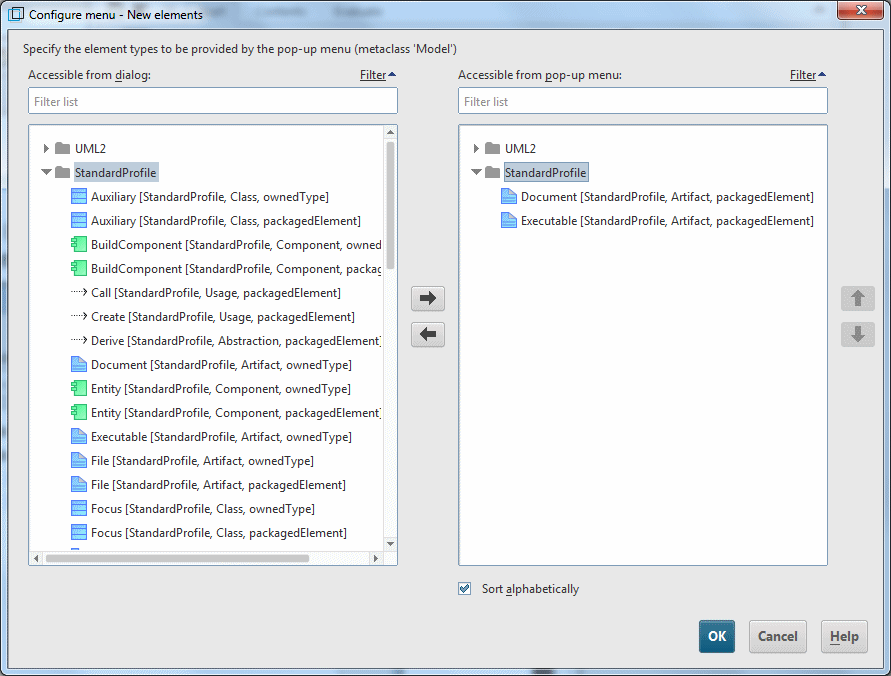
Figure 202 shows the configuration dialog for a model to which the UML standard profile is assigned. In addition to the UML category, which contains all element types that can be created in a model, a second category StandardProfile is displayed. It contains all stereotypes of the standard profile that extend the element types contained in the UML category. In this example, the stereotypes «Document» and «Executable» were added to the pop-up menu. The name of the stereotype is followed by square brackets containing the name of the profile in which the stereotype is defined, the name of the metaclass being extended by the stereotype, and the metaproperty used when creating the element.
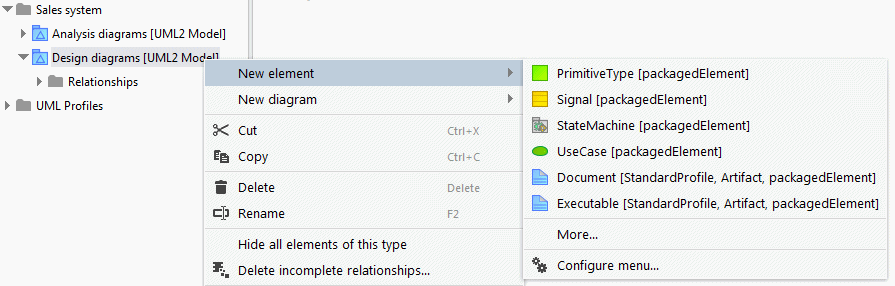
Figure 203 shows the New element pop-up menu of the model. It now contains the two stereotypes. Selecting Document [StandardProfile, Artifact, packagedElement] creates a new element of the UML type Artifact for the packagedElement property of the model. The element is assigned the «Document» stereotype.