Stereotypes in the Symbols bar of diagrams
Assigning a profile to a package affects the Symbols bar in the diagrams contained in the package. For each symbol for whose metaclass the profile defines a stereotype, an additional symbol with the name of the stereotype is provided.
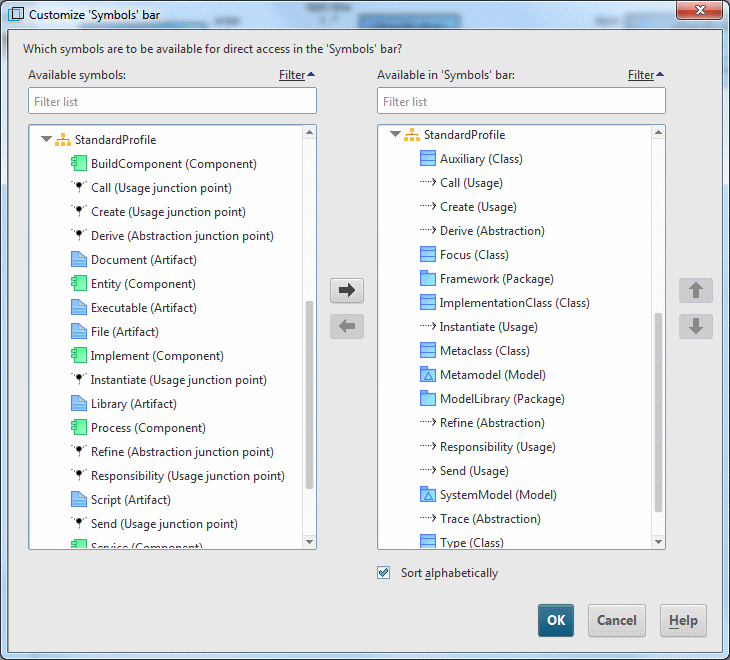
Figure 204 shows the configuration dialog for the Symbols bar for a Class diagram, whose package has been assigned the standard profile. In addition to the categories for the individual diagram types, another category is displayed for the standard profile. It contains symbols for the corresponding stereotypes. The name of the underlying default symbol is displayed in brackets after each stereotype name.
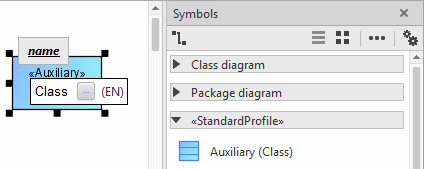
The Symbols bar also shows the stereotype symbols of a profile in a separate category, which is headed by the name of the profile enclosed in a pair of guillemets (see Figure 205).
For example, if you add the Auxiliary (Class) symbol to the Symbols bar for this kind of Class diagram and create an element in the diagram for this symbol, a new class is created in the diagram and this class is automatically assigned the «Auxiliary» stereotype.