Linked diagrams (elements)
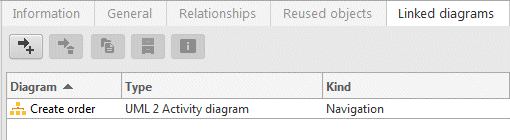
All diagrams that are linked to the selected element are displayed here. If the selected element has a presentation in a diagram, it is displayed with an assignment symbol. This supports navigation to the linked diagrams in that diagram.
This kind of link can take three forms:
Ownership
The diagram belongs to the selected element. It appears as a child node of the element in the Explorer tree.
Navigation
The diagram has been assigned to the element for the purpose of navigation. This kind of link has no semantics. It is only used to provide a simple way of navigating from an element to a diagram. Unlike diagram assignments in the ARIS standard, no restrictions exist here. Every diagram type can be linked to every element type.
Implicit ownership
In this case, the diagram does not directly belong to the selected element. It is a behavior diagram whose owner belongs to the selected element. For example, if you want to model the internal process of a use case in an Activity diagram, you create an activity as ownedBehavior of the use case and a corresponding Activity diagram for the activity. This Activity diagram is automatically linked to the use case through implicit ownership. Implicit ownership is not supported for structure diagrams. For example, if a child package of a package has Class diagrams, they are not linked to the package.
You can call up the following functionalities:
 Assign diagram
 Removed assigned diagram (only for assignments of Navigation type)
 Open diagram
 Go to occurrence of diagram in Explorer
 Show diagram properties