Creating a filter profile
In Creating a profile you have seen how to create a profile that completely supports UML by creating a relationship of the Meta model reference type between the profile and the UML metamodel. Within a package to which this kind of profile is assigned, all UML symbols are still available in diagrams in addition to the stereotype-based symbols.
If you delete the Meta model reference relationship in the profile in Figure 221, the Symbols bar for a Use case diagram only displays two symbols for the «Business use case» stereotype. Here, delete means deleting the element and not just its graphic presentation in the diagram.
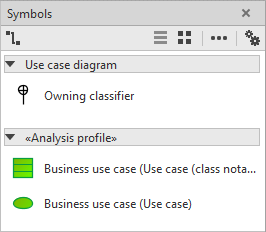
In addition to the symbols whose metaclasses are permitted by the profile, the Symbols bar also displays all edge symbols that represent a metaassociation and whose two end types are also permitted by the profile. Here, delete means deleting the element and not just its graphic presentation in the diagram. In Figure 242 this applies to the Owning classifier symbol. It does not represent a metaclass, but the metaassociation A_ownedUseCase_classifier, by which a classifier can own use cases. The metaclass UseCase permitted by the stereotype in the profile inherits from the Classifier metaclass, which means that relationships of this type are also possible when using the profile.
The toolbars for other diagram types in which use cases are not allowed are completely empty.
You can selectively add individual metaclass to the profile by placing them in the Profile diagram and linking them to the profile using the Meta class reference relationship.
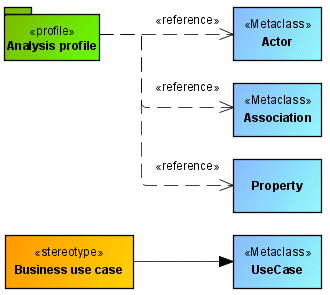
This profile specifies that all elements of the Actor, Association, and Property types can be used in diagrams, along with elements of the UseCase type, if the «Business use case» stereotype is assigned to them.
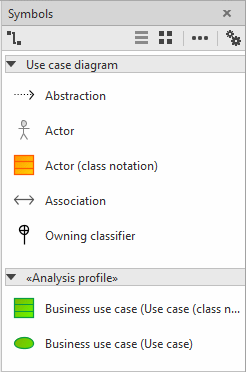
This type of profile definition requires some prior knowledge of the UML metamodel and its graphical representation in diagrams. In the above example, if the Property metaclass were not assigned to the profile, the Association symbol would not be available in diagrams, as an edge presentation for an association can only be created in conjunction with its two association ends, which are of the Property type.
Note that a profile only has an effect on the new things you can create in a diagram. Existing diagram content not supported by the profile is retained in the superior package even after assigning the profile to the diagram.