Creating a stereotype
Stereotypes are used to express particular semantics that are not provided in the UML standard, for example, the «Technical class» and «Design class» stereotypes for illustrating the meaning of the corresponding classes, or to define new properties. The stereotypes of the UML standard profile fall into the first category. They do not define any new properties.
If you want to define a new stereotype, you must first create it in the Profile diagram. Of course, you could also create and edit the stereotype in the Explorer tree. However, the link with the corresponding metaclass in particular will then involve considerably more work than with graphical modeling.
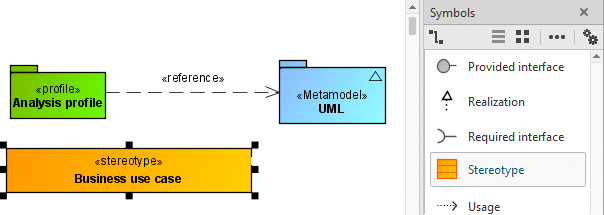
The next step is to place the metaclass to be extended from the generated UML metamodel in the diagram and to link the stereotype with the metaclass using an Extension relationship.
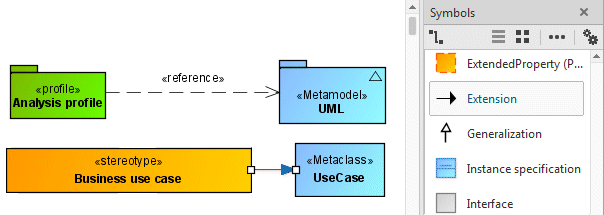
In the example diagram, the representation options for the Extension relationship have been adjusted so that no multiplicities and names are displayed (Extension is a special form of the association), and for the metaclass the feature view of details has been suppressed so that no attributes are displayed.
For user-defined stereotypes, their description texts are displayed in the stereotype assignment dialog.

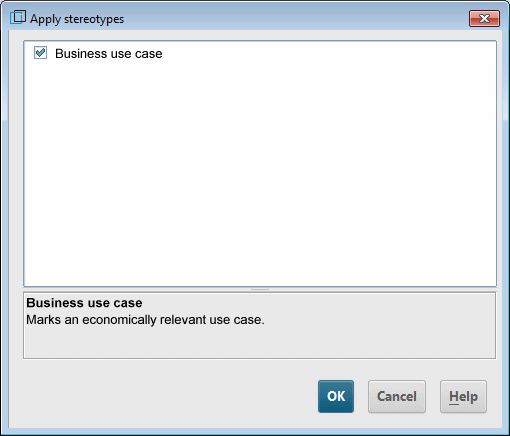
Figure 223: User-defined stereotype with description in the stereotype selection dialog
If you only want to allow use cases with the «Business use case» stereotype in packages to which you have assigned the Analysis profile, you can indicate this on the Extension relationship in the Profile diagram by selecting Specify as 'required' in the pop-up menu or clicking the corresponding button in the Content tab bar:
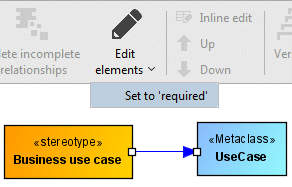
In the Profile diagram, the keyword {required} is displayed on the Extension relationship. Flagging an Extension relationship as required changes the multiplicity of the association end linked to the stereotype from [0..1] to [1]. As the multiplicities of Extension relationships are not normally displayed in diagrams, the keyword {required} is displayed on the edge instead.

This change means that when you create a use case in a package to which the profile is assigned, it is automatically given the «Business use case» stereotype. However, setting this property only makes sense if you have not defined more than one stereotype in your profile for the corresponding metaclass.