Implicit changes bar
The Implicit changes bar logs changes to UML elements and diagrams that occur implicitly due to changes elsewhere.
A typical example of this kind of implicit change is shown below.
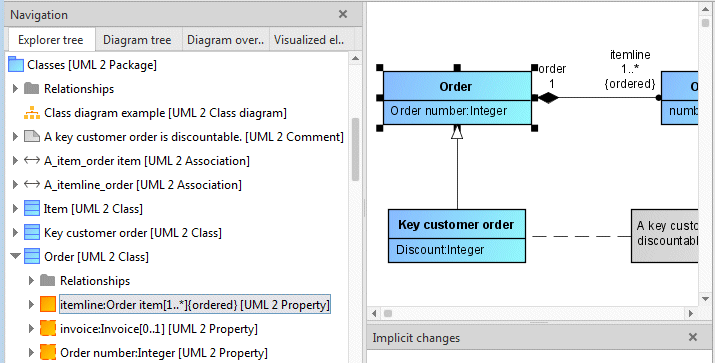
Figure 97 shows a Class diagram with a binary association between the Order and Order item classes. The two ends of the association are navigable as attributes of the classes involved. For this reason, the itemline association end is a child of the Order class in the Explorer tree. It is displayed as text itemline:order item[1..*]{ordered} with its type, the Order item class.
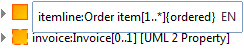
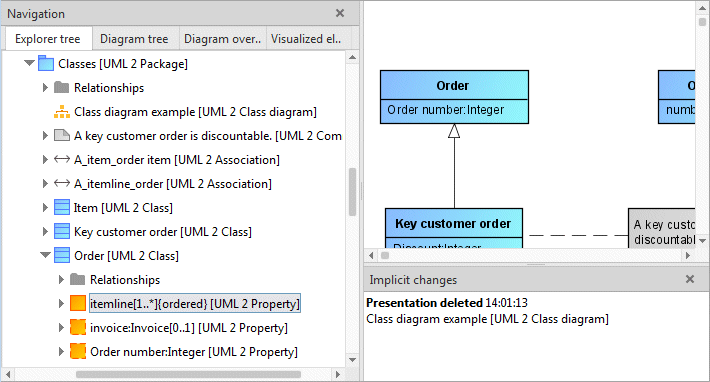
If we now rename this association end and delete the type specification, this means that the itemline association end is no longer linked to the Order item class. This also removes the association edge from the diagram, which represents an implicit change that is not always directly identifiable for the user.
This implicit change is logged in the Implicit changes bar.
Logging of implicit changes can be enabled and disabled on the global options page Modeling.