Designer
When you open a UML diagram, it is displayed in the Designer component.
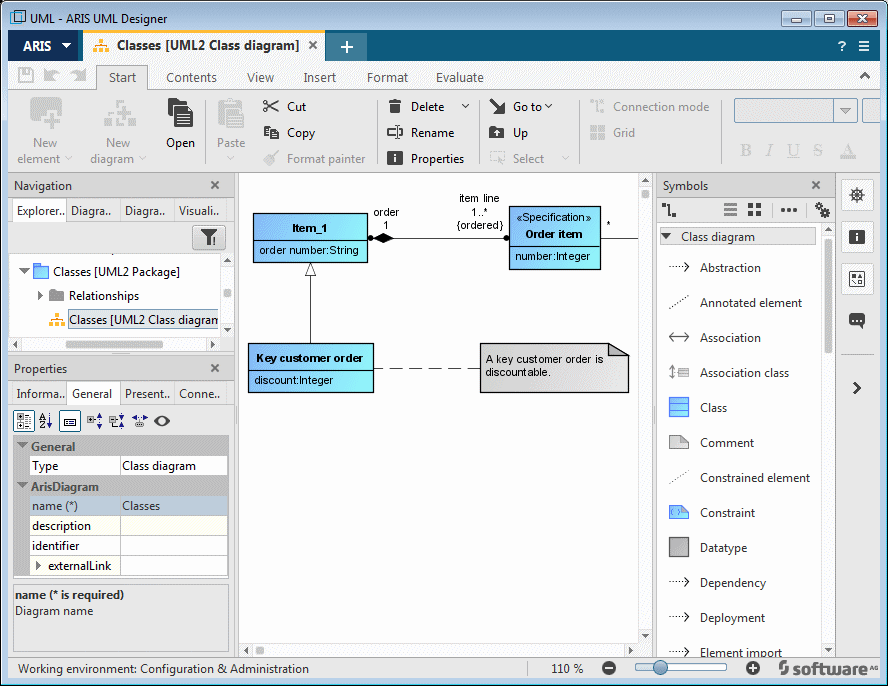
The Designer component is divided into four areas – the modeling area, and the Navigation, Properties, and Symbols bars. The bars can be hidden to create more space for the diagram representation. In addition, you can rearrange the bars by dragging them with the mouse button held down.
The following buttons are available on the far right of the window:
 Shows and hides the Navigation bar
 Shows and hides the Symbols bar
 Shows and hides the Properties bar
 Shows and hides the Implicit changes bar
 Hides all bars
 Shows all bars
For the screenshots shown below, the individual bars have been arranged in such a way that they provide a useful representation adapted to the page width available in this document.