How does the system assist you in creating edges?
You can place node and edge symbols on the mini toolbar and the Symbols bar so that you can select them directly when modeling. In this way, there is no need for you to subsequently select the edge type.
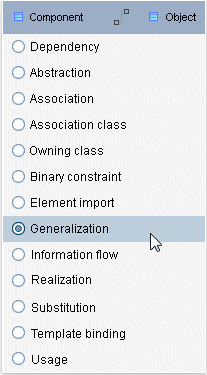
However, if you use the  edge symbol of both bars, clicking the target element will offer a list of edges for you to select the one you want to use to link the source element with the target element.
The system provides further assistance:
If a connection cannot be used to link two items according to the method, a prohibitory sign will be displayed at the target object.
If you draw a connection from a source to a target item, but the method only allows a connection from the target to the source item, the permitted connection will be created.
If only one type of connection from the source to the target item is allowed by the method, the new connection is created directly, even if a connection from the target to the source item exists. If only a connection between the objects from the target to the source object is possible and not from the source to the target object, this connection is automatically created. The connection direction goes from target to source object.
If several connection types from the source to the target item are possible, they are offered in a pop-up window. Click the connection type that the new connection should be based on. If the target item is already connected with a certain type of connection, this is displayed via an enabled check box and the connection can no longer be selected.