Use the mini toolbar
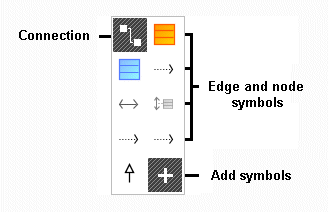
The mini toolbar provides you with the Connection and Add symbols buttons, as well as the node and edge symbols that you can connect with the selected element. You are only offered elements that can be connected with the selected element.
The mini toolbar is shown as transparent if you select a node symbol in the diagram window and the mouse pointer is over the node symbol. The mini toolbar remains transparent until you move the mouse pointer onto it. It then completely covers the background.
If you do not want the mini toolbar to be shown for a selected node symbol, move the mouse pointer a few centimeters away from the node symbol. The mini toolbar will only be shown again when you deselect the node symbol that is currently selected, and then select this node symbol again.