Graphic nestings
In many cases, in ARIS UML Designer diagrams the ownership of one element by another can also be indicated by a presentation of the element being graphically nested in the presentation of the owning element. In some cases, graphic nesting can also represent a relationship that is not ownership. However, a common feature of all graphic nestings in ARIS UML Designer is that they always represent a relationship between the elements at definition level.
When creating or moving an element in the diagram, presentations in which the element can be nested are indicated by a border when the mouse pointer is located within the potential nesting container.
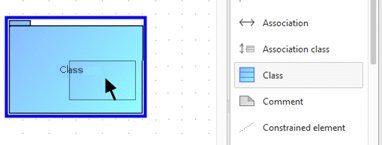
Once the class has been created as a nested presentation in the package, it is also contained in the package in the Explorer tree.
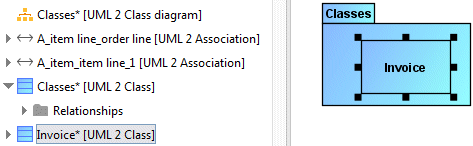
The appearance of a class in a diagram as an element nested in a package represents an alternative notation to the link using an Owning package edge shown in Figure 115.
A series of options exist that influence the behavior of ARIS UML Designer when modeling with nestings.
The first options relate to how the relationships underlying the graphic nesting are handled.
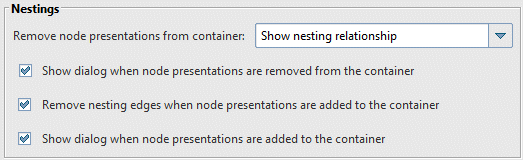
If the two Show dialog when... options are enabled, a corresponding query is displayed when modeling. In this case, if you move the class in Figure 118 out of the package to the diagram background, the Unnest node dialog opens:
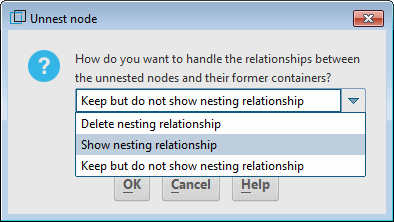
Selecting Delete nesting relationship moves the class into the package in which the diagram is located. Selecting Show nesting relationship displays an Owning package relationship between the class and the package. The Keep but do not show nesting relationship option means that no relationship is displayed in the diagram; the class remains contained in the package at definition level.
A further option relates to the situation where one element can be nested in another in different ways.

In rare cases, a UML element can own another element of a particular type in more than one way without the semantic difference between the different types of ownership being obvious and really relevant to the user. One example of this is the UML type Constraint.
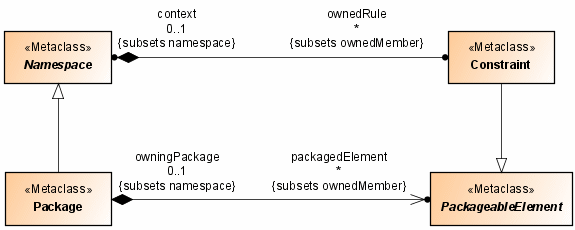
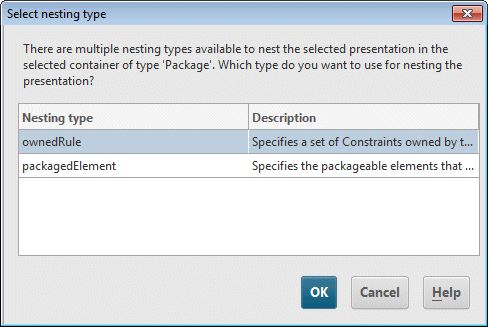
Every UML element whose type inherits from the Namespace metaclass can own constraints through its ownedRule property. Every UML package can own elements whose type inherits from the PackagedElement metaclass through its packedElement property. As the Constraint metaclass inherits from PackagedElement, you can either insert a constraint in a package as an ownedRule or as a packagedElement.
If the Automatically specify owner property when creating owned elements option is enabled, when creating a constraint in a package there is no query as to whether the constraint is to be contained in the package as an ownedRule or a packagedElement. In this case, it is automatically created as an ownedRule in the package.
You can also change the nesting type later by calling up the Change nesting kind item in the pop-up menu for the nested element. The Select nesting type dialog opens to select the corresponding nesting type.